Hermes Agent as a WhatsApp Business Assistant
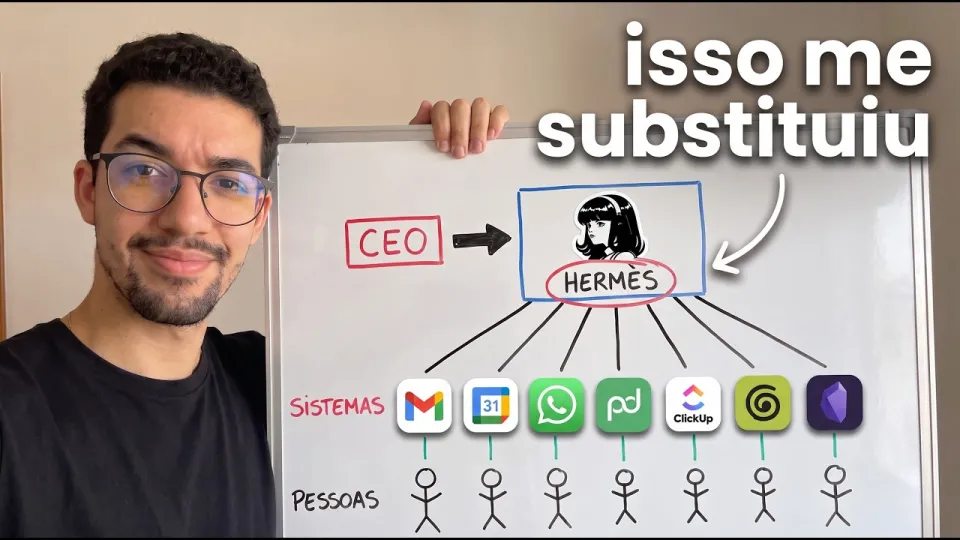
Video: Eu era o gargalo do meu negócio, até usar o Hermes assim
· based on the channel Well Pires
Key takeaways
- Hermes Agent runs as a self-hosted AI agent that the whole team reaches through WhatsApp, not a dashboard.
- It pulls context from a company "second brain" (Notion-style docs), meeting calls from Granola and proposals sent via PandaDoc.
- Two deployment paths: managed cloud for speed or a VPS for full control over data and cost.
- Skills and Composio connectors are what let the agent actually act: send documents, book calls, run routines without approval.
- The author's stack also includes Higgsfield for visuals and a paid community for ongoing support.
Hermes Agent is a self-hosted AI agent that a whole team can talk to directly in WhatsApp, and it is used as a business assistant rather than a chatbot: it reads the company knowledge base, pulls meeting notes, sends proposals and runs recurring routines on its own. In the setup shown by Well Pires, the agent becomes the operational layer between the founder and the team, so routine decisions stop queuing up at one person. The visual side of that workflow — generated art and assets — runs through Higgsfield, which the channel links as its creative tool.
The core idea is simple: the bottleneck in a small company is usually the owner, not the tools. Hermes moves the owner's judgment into a reusable agent that answers in the same chat app the team already uses.
What Hermes Agent actually does in a company
Hermes Agent is best understood as an agent runtime with a messaging front end: the model reasons, tools execute, and WhatsApp is where people talk to it. In the workflow described on the channel, the agent sits on top of a "second brain" — a structured knowledge base of the company — and answers team questions from it instead of guessing.
Three jobs define the role:
- Answering with company context. The agent queries the internal knowledge base before replying, so answers about pricing, process or positioning come from documented material rather than the model's general knowledge.
- Acting through integrations. It retrieves calls recorded in Granola and pushes proposals out through PandaDoc, which means the agent produces artifacts, not just text.
- Running routines unattended. Scheduled tasks execute without a human approval step, which is the part that actually removes the founder from the daily loop.
That third point is where most teams hesitate, and reasonably so: an agent that sends documents and answers clients needs scoped permissions and a clear list of what it may never do.
Models, costs and cloud versus VPS
Model choice and hosting are the two decisions that determine what Hermes costs to run. The agent is model-agnostic in practice: you pick a provider for reasoning quality and a second, cheaper one for high-volume routine work, then route tasks accordingly. Splitting a strong model for planning from a fast model for lookups keeps the monthly bill predictable.
On hosting, the trade-off is straightforward:
- Managed cloud is the fastest path — no server maintenance, quick setup, but less control over where data lives and a recurring per-usage cost.
- VPS gives full control of the environment, persistent storage for the knowledge base and predictable monthly pricing, at the cost of you owning updates, backups and uptime.
A practical middle route many teams take: prototype in the cloud, then move to a VPS once the routines are stable and the data volume grows. Reliability matters here — a hosting outage takes the agent offline for the whole team, so uptime history is worth checking before committing.
Skills and connectors that turn chat into action
Skills are the packaged capabilities that tell Hermes how to perform a specific job, and connectors are how it reaches external services. Together they are the difference between an assistant that talks and one that works.
A working setup usually includes:
- Knowledge skill — search and cite the internal second brain before answering.
- Meeting skill — pull call transcripts and summaries from Granola and turn them into follow-ups.
- Document skill — generate and send proposals through PandaDoc with the right template and variables.
- Calendar and CRM connectors — book calls, log interactions and keep records current.
Composio handles a large share of the connector work by exposing pre-built integrations instead of custom API code for every service. The rule that keeps this manageable: connect only what a routine actually uses. Every extra integration is another permission to audit.
Automating routines without manual approval
The point of unattended routines is to move recurring decisions out of the founder's inbox. In the described structure, the agent handles the steps that are repetitive but still need judgment: qualifying an inbound lead, sending the standard proposal, scheduling the follow-up call, and reporting the outcome back into the chat.
A sane rollout looks like this:
- Run the routine in draft mode for two weeks and compare its output with what a human would have sent.
- Define hard limits: maximum discount, which templates it may use, which contacts it may never message.
- Turn on automatic execution for the narrowest version that passes review, then widen scope step by step.
- Keep a log of every action so any mistake can be traced to a specific step.
Teams that skip step one usually end up rebuilding trust from zero after a single bad send.
Common concerns about stacking too many tools
A recurring worry among viewers is tool overload — the feeling that every new platform adds cognitive load instead of removing it. That concern is valid, and the answer is consolidation: pick one place for knowledge, one for tasks and one for communication, then let the agent bridge them.
A few practical positions:
- Consolidate before you automate. If the same information lives in three tools, the agent will give three different answers. A single Notion-style workspace as the second brain removes most of that.
- Fewer connectors, deeper use. Two integrations the agent uses daily beat ten it touches once a month.
- Judge the community by output, not by price. Paid groups are worth it only if you can see finished projects and get answers to specific setup questions; ask what the support channel looks like before subscribing.
- Budget for hosting reality. Cheap VPS plans fail; check what happens to your agent during an outage and keep a backup path.
Useful links
- Higgsfield, the visual and MCP tooling used alongside the agent: https://higgsfield.ai/s/higgsfield-mcp-general-yt-wellpiresai-YqtyQN
- VPS hosting for installing Hermes: https://www.hostg.xyz/SHK9l
- The author's AI community: https://www.aimakersclub.com.br/
- Course notes on the Obra method: https://ring-operation-fc7.notion.site/Aulas-que-parecem-museu-O-m-todo-OBRA-3f5f41ce2b37817b8948e37a91c6129c
Bottom line
Hermes Agent is worth considering when the founder, not the software, is the constraint on growth: it puts company knowledge, documents and routines behind one WhatsApp contact the team already knows how to use. The build is less about the model and more about discipline — a clean knowledge base, a short list of connectors, and routines tested in draft mode before they run alone. Hosting choice follows from that: start in the cloud, move to a VPS when the workload justifies it. The full walkthrough, including the second-brain setup and the Higgsfield visuals, comes from the Well Pires channel, which is the best place to see the structure in motion. If you want the creative tooling from that stack, start with Higgsfield and build the agent around it.
Questions & answers
What is Hermes Agent and how is it different from a normal chatbot?
Hermes Agent is an agent runtime with a messaging front end: it reasons with a language model, calls tools through skills and connectors, and talks to the team in WhatsApp. Unlike a chatbot, it retrieves company documents, sends proposals and runs scheduled routines without a human triggering each step.
Should I run Hermes in the cloud or on a VPS?
Cloud is faster to set up and needs no server maintenance, which suits testing and small teams. A VPS gives control over data location, persistent storage and predictable monthly cost, but you own updates, backups and uptime — so check the provider's reliability record first.
How many tools and integrations do I actually need?
Fewer than you think. One knowledge base, one task manager and a handful of connectors the agent uses daily will outperform a large stack. Every extra integration is another permission to audit and another source of conflicting answers.
Is a paid AI community worth it for learning this setup?
It depends on whether you can see finished projects and get answers to specific setup questions before paying. Ask what support looks like, whether the material covers your hosting and model choices, and whether members share working configurations rather than general advice.
Source: Eu era o gargalo do meu negócio, até usar o Hermes assim · Markdown version